For Dynamics 365 Business Central · Essentials

See every person's real load. Weeks ahead.

SmartFlow Projects puts every project's plan on one board against everyone's actual Business Central resource capacity — the double-booked consultant, the overloaded week, visible before either becomes a delay. A finite-capacity scheduling engine checks the plan against real capacity, and when you accept it, the dates move in Business Central.
7-day trial· Sandbox sample data included· Runs on Business Central Essentials
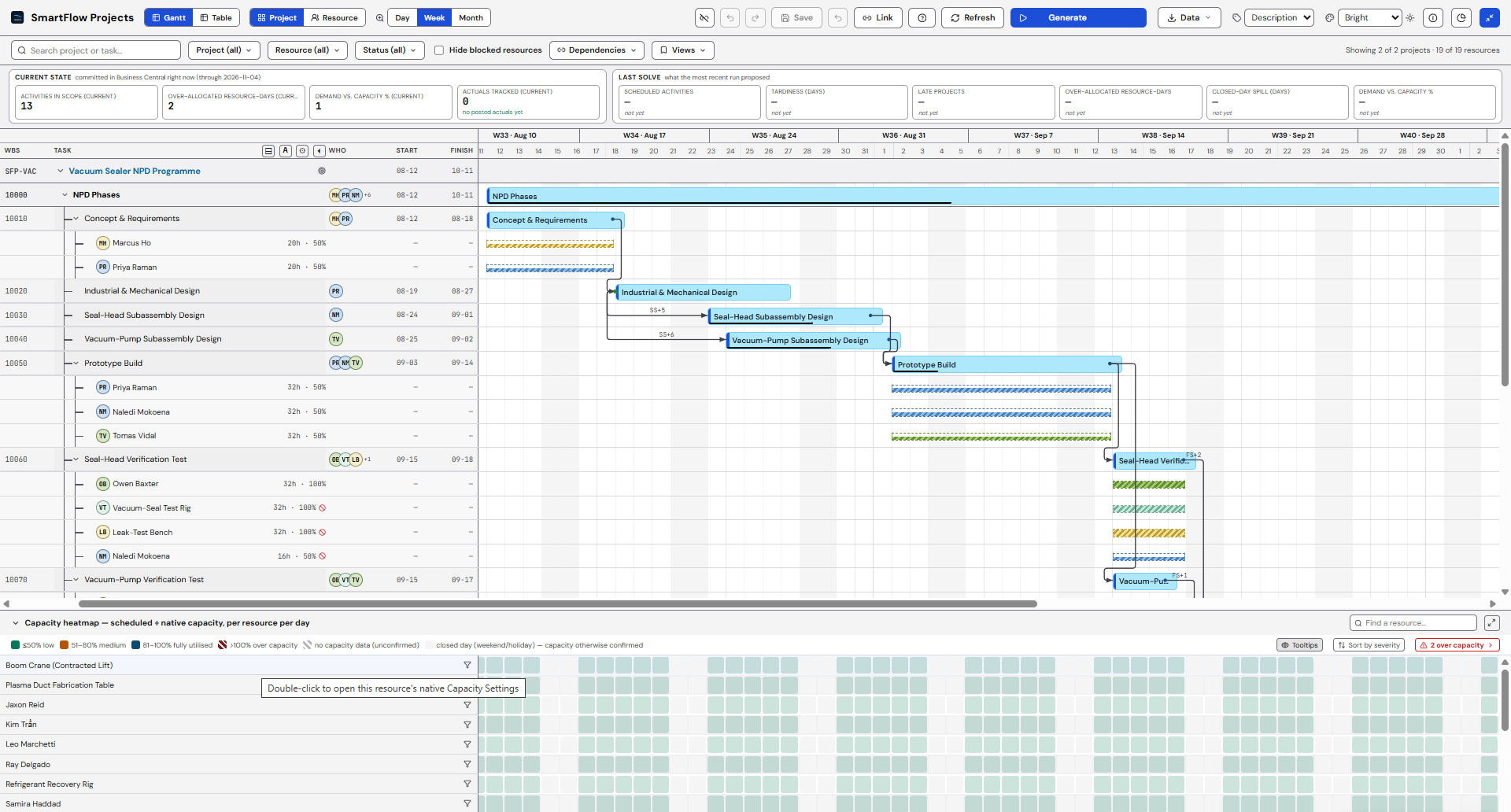
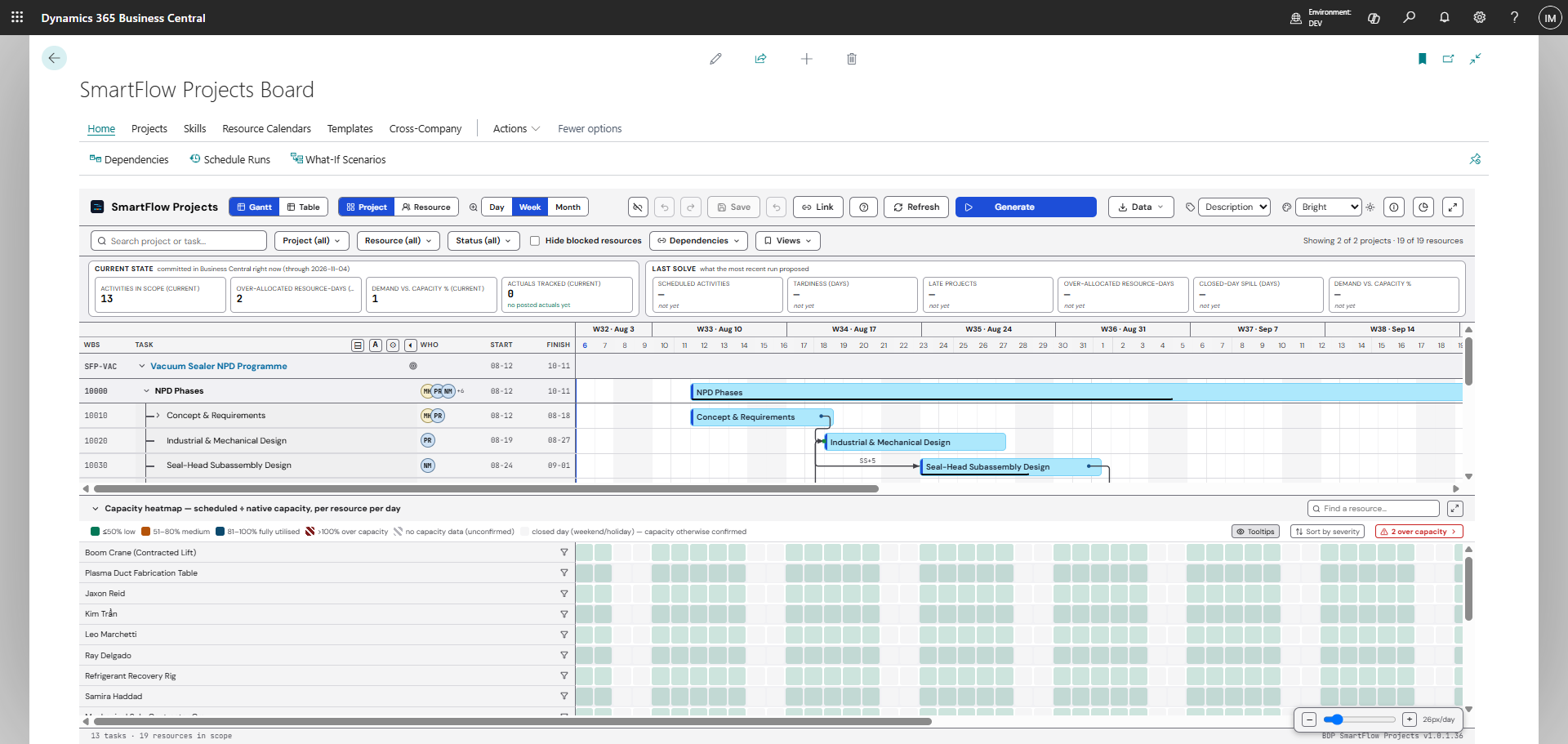
The SmartFlow Projects board inside Business Central: a KPI strip showing 13 activities in scope and 2 over-allocated resource-days, a work-breakdown tree with colour-coded task bars on a week-scaled timeline, an SS+5 dependency arrow drawn between two design tasks, and beneath it a per-person capacity heatmap covering 19 resources with 2 flagged over capacity.
Over capacity 1 person · 2 projects · same week
Resolved Sandbox sample data

From Business Dynamics Pro — the team behind SmartFlow APS, D365Q, WarehouseQ, and PlanAI for Business Central.

The blind spot

Business Central checks the calendar. It doesn't level the team.

Business Central tracks a project's budget, its WIP, its billing — a financial ledger, not a finite plan. Job Planning Lines tell you what's due; they don't tell you whether the person assigned is already committed to a different project the same week. Two projects can lean on the same consultant at once, and the only answer Business Central gives you is a load graph over 100%.

SmartFlow Projects puts a real solver against that same plan — checking every person's actual capacity before a delivery date is promised, not after it's missed.

One consultant · One week · Two projects
CAPACITY 100% MON TUE WED THU FRI PROJECT A · full week PROJECT B · Wed–Fri ▲ One person, two projects, three overlapping days — over capacity
See it run

Eighty seconds, from a live client.

A project that doesn’t fit, levelled against the team’s real capacity, reviewed line by line, and written back to Business Central. Recorded from a running client — not an animation, and not a mock-up.

1:21 · nothing is sent to YouTube until you press play. Watch on YouTube
01 See · Level · Apply

Three moves, one board.

See

Every project, every person, one board.

A day-scaled Gantt grouped by project, plus a resource perspective and a per-person capacity heatmap. The whole portfolio in front of you, not scattered across job cards.

Level

A solver checks it against real capacity.

Generate a plan and the scheduling engine schedules every task against each person's actual Business Central resource capacity — a hard ceiling, not a suggestion.

Apply

Accept, and the dates move in Business Central.

Review the proposal — what moves, and why — then accept it. The plan writes back to native Business Central tables. Nothing moves until you click Accept.

02 The solver

Real math, with its work shown.

A consultant booked on two projects at once is a math problem, not a gut call. SmartFlow Projects resolves it against a finite-capacity model that treats each person's capacity as a hard ceiling — it will make a project late before it books someone past their day. Every task the solver moves carries the reason it moved, and nothing writes back until you review it and click Accept.
Finite-capacity scheduling engine Hard capacity ceiling Per-task reasons shown Accept-gated · you stay in control
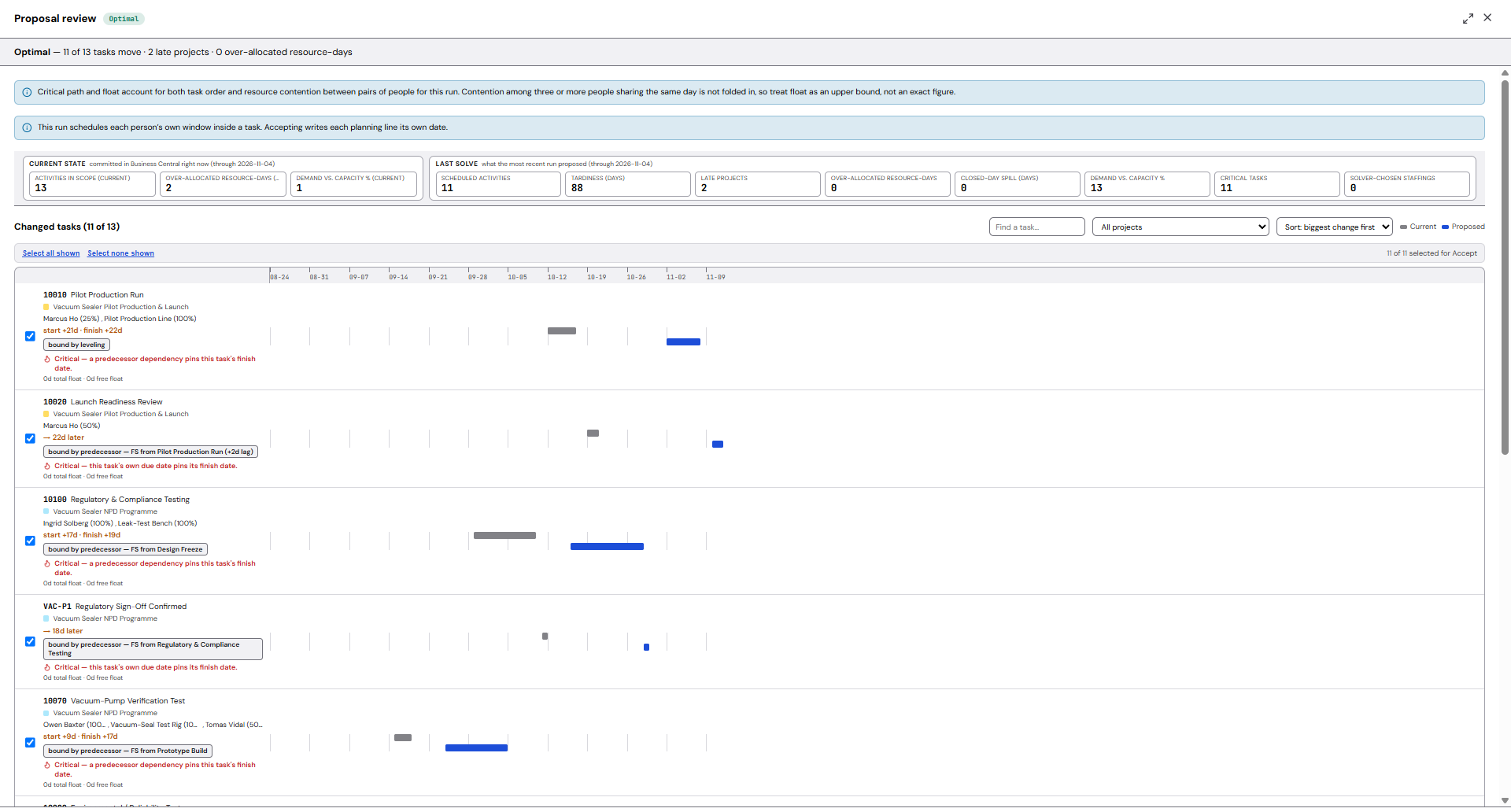
The SmartFlow Projects proposal review, reporting an optimal solve: 11 of 13 tasks move, 2 late projects, 0 over-allocated resource-days. Each moved task carries the reason it moved — bound by levelling, or bound by a predecessor with its link type and lag — alongside its total and free float in days, with current and proposed bars drawn side by side.
Captured on the sandbox sample portfolio that ships with the app — not a benchmark, and not a result promised on your data.
03 Dependencies

All four link types. Each with a lag.

Predecessors aren't always "finish, then start". SmartFlow Projects ships all four dependency types, each with a positive or negative lag in days, checked at every layer — the moment you create a link, and again when a plan is built.

+1d
FS · Finish-to-Start

Task B waits for Task A to finish.

The default link. Most plans are built from these.

0d
SS · Start-to-Start

Task B starts alongside Task A.

For work that has to kick off together, like a review track.

−2d
FF · Finish-to-Finish

Task B must finish with Task A.

For work that has to land together, like sign-off tasks.

+3d
SF · Start-to-Finish

Task B must finish before Task A starts.

The rare one — handoffs where the outgoing task caps the incoming one.
Cycle detection A circular chain — A depends on B, B depends on A — is refused the moment you try to create it, not caught later when a solve fails.
Dependency Worksheet A dedicated worksheet for bulk predecessor entry, so wiring up hundreds of planning lines doesn't mean hundreds of clicks.
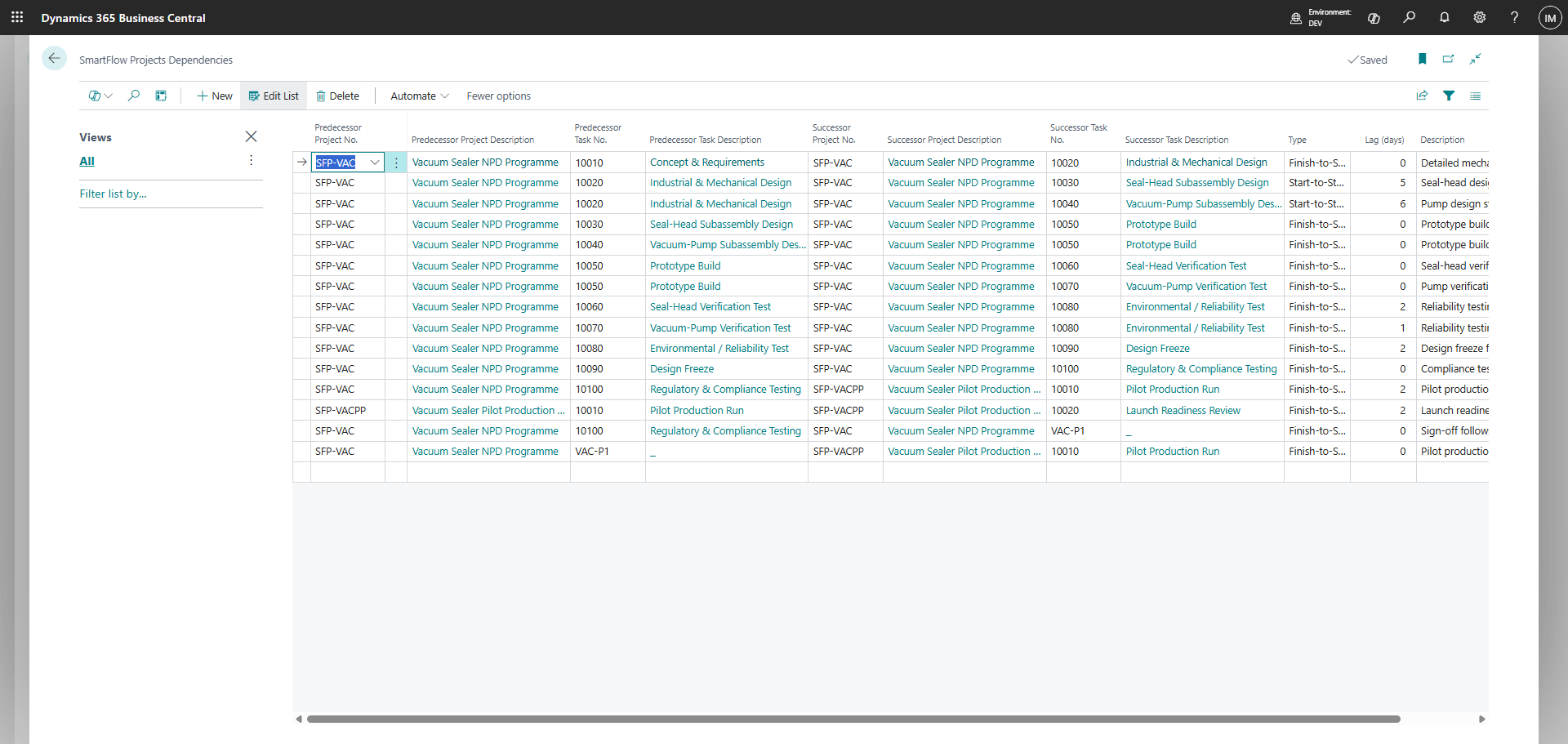
The SmartFlow Projects dependencies list: predecessor and successor task pairs with an explicit link type — finish-to-start, start-to-start, finish-to-finish and start-to-finish — and a signed lag in days on each link.
Captured on the sandbox sample portfolio that ships with the app.
04 What it does

Resource scheduling — inside Business Central.

No second application. No separate login. No sync. SmartFlow Projects reads and writes standard Business Central Jobs, Job Planning Lines and Resources — one board, on the screen your delivery team already works in.

Capacity heatmap

See every person's real load across every project.

A per-resource heatmap reads native Business Central resource capacity and shows committed load, day by day, weeks ahead — independent of whether you've run a solve.

Finite-capacity scheduling

Capacity is a hard ceiling, not a suggestion.

A real constraint solver schedules against each person's actual capacity. It will make a project late before it books someone past their day.

All four dependency types

Finish-to-Start, Start-to-Start, Finish-to-Finish, Start-to-Finish.

Each with positive or negative lag, checked for cycles the moment you create the link.

Dependency Worksheet

Bulk predecessor entry, fast.

Wire up dependencies across hundreds of planning lines from one worksheet instead of one task at a time.

Interactive board

Drag a bar. Undo it if you change your mind.

Twenty staged changes of undo and redo before you save, plus filtering and search across the portfolio.

Independent verification

A second pass checks what was written.

After a plan is applied, an independent pass re-checks the written result against precedence, capacity and duration, and reports what it finds — it doesn't silently fix anything.

Skip ladder

Locked and pinned tasks stay put — and get counted.

Tasks that must not move — locked, pinned, inside your frozen horizon — are skipped and counted, not silently changed.

Native to Business Central

No external database. No connector. On Essentials.

The board reads and writes native Jobs, Job Planning Lines and Resources tables, planned in whole days, on Business Central Essentials — no Premium licence required.

Every capability above is built and running today. Evaluate all of it against the sandbox sample data that ships with the app before you point it at a real project.

05 Two perspectives, one plan

See the plan as a project. See it as a person.

The same underlying plan, read four ways — switch perspective without leaving the board.
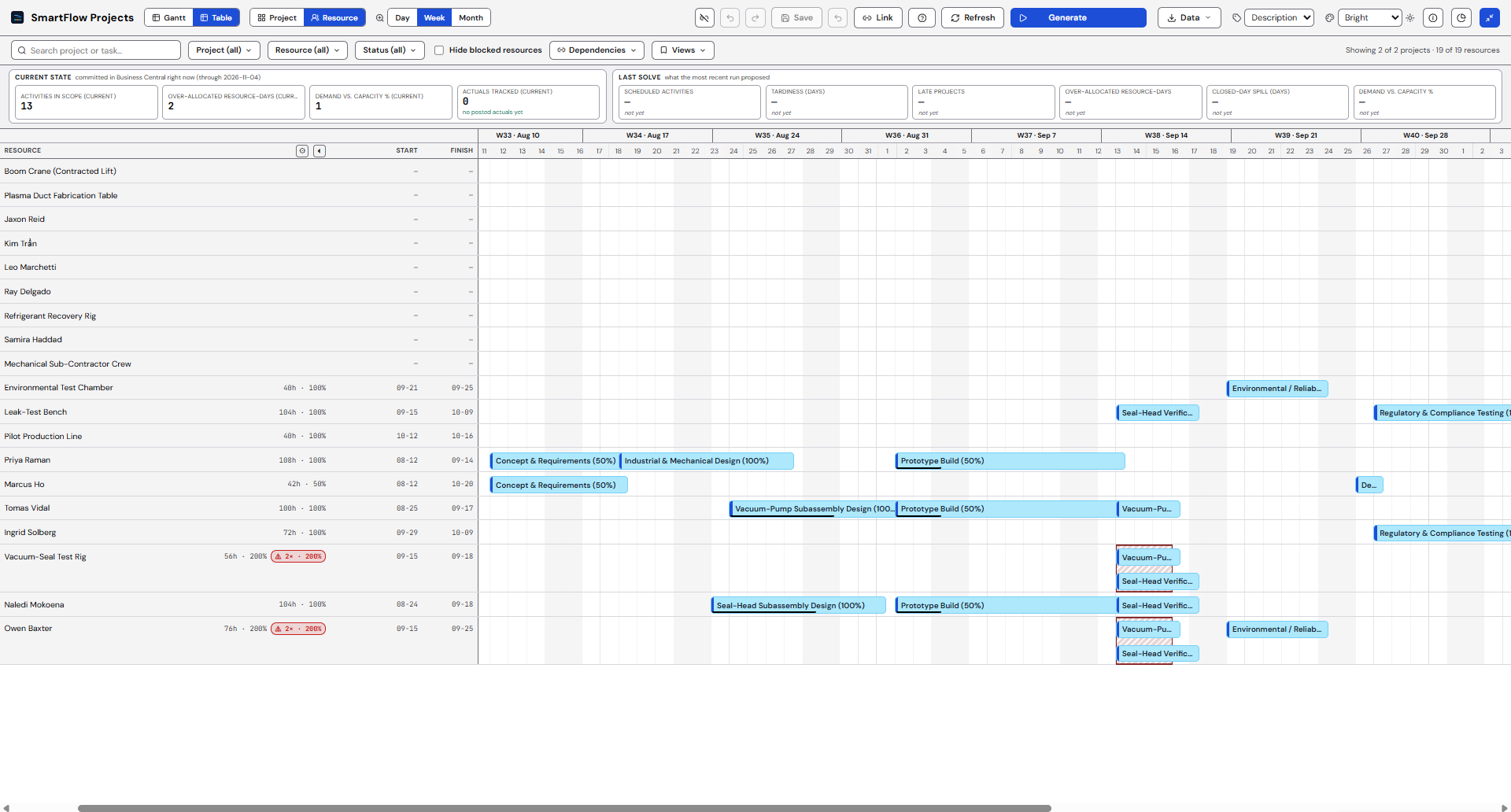
The SmartFlow Projects board in resource perspective: each person on their own row, carrying the tasks they are assigned across every project in scope, so work that collides between two projects in the same week is visible on one line.
Resource perspective. Captured on the sandbox sample portfolio that ships with the app.
The SmartFlow Projects capacity heatmap expanded to day detail: each person's committed load per day against their Business Central resource capacity, banded from at-or-below 50 per cent through fully utilised to over capacity, with closed days and days holding no capacity data marked distinctly from days measured as free.
Capacity heatmap. Captured on the sandbox sample portfolio that ships with the app.

Project perspective

The Gantt grouped by project — the view a delivery lead opens first.

Proposal review workspace

Current versus proposed, side by side, with a reason for every task that moves.

06 How a plan flows

From Business Central, and back again.
01
Plan in BC
02
See it on the board
03
Generate a plan
04
Review the proposal
05
Accept
06
BC tables updated
Writes back to native Business Central tables — nothing moves without your Accept.
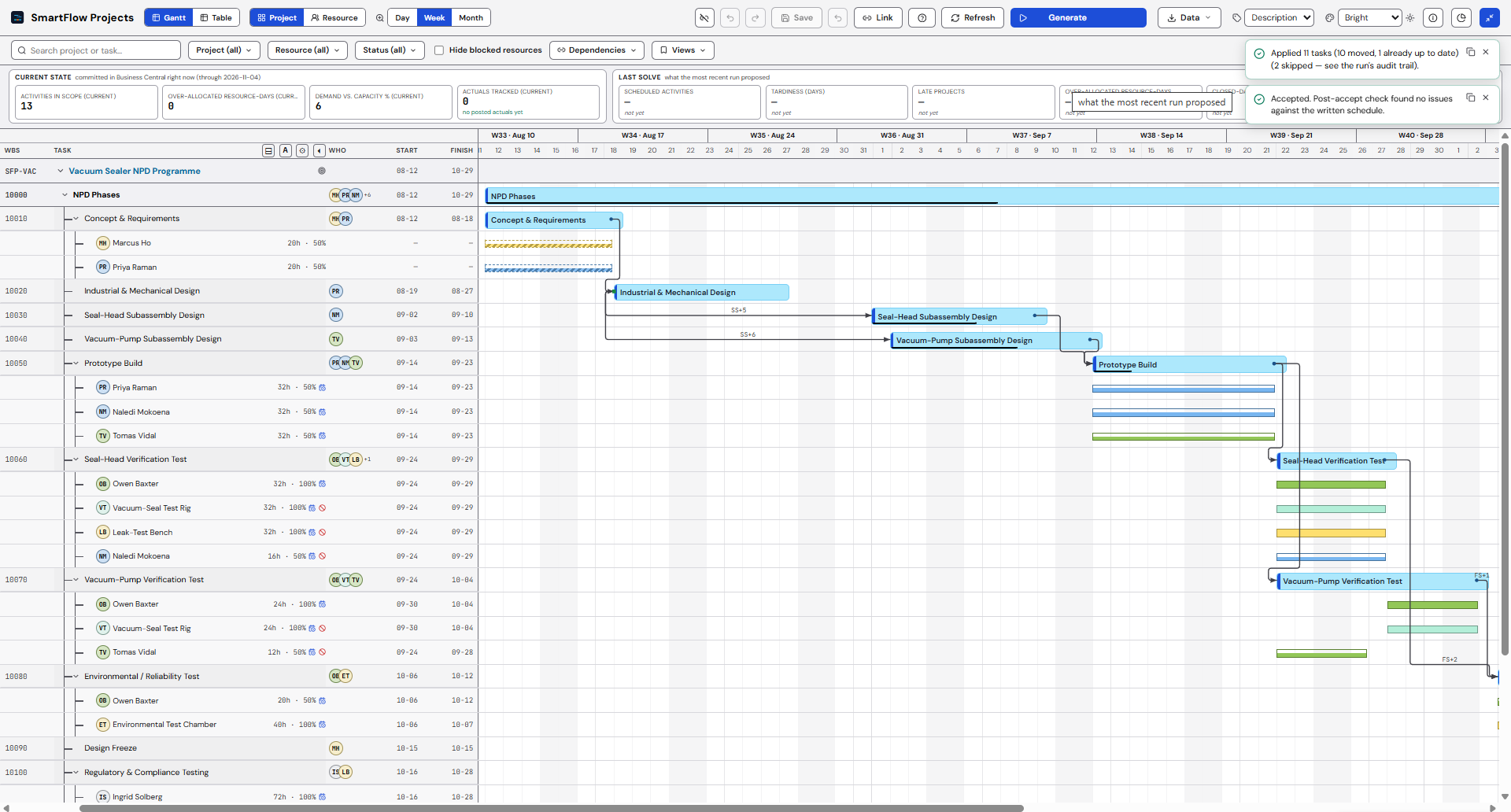
The result of accepting a SmartFlow Projects plan: the proposed dates written back to the Business Central project tasks, with a per-task count of what was applied, what was already up to date and what was deliberately skipped, recorded in the run's audit trail.
Captured on the sandbox sample portfolio that ships with the app, immediately after Accept & write back. The second notice is the independent verification pass doing its job — it re-reads the dates actually written and reports anything that doesn't hold together, rather than trusting the run that produced them.
Licensing

Runs on Business Central Essentials. Not Premium.

Jobs, Job Planning Lines and Resources are all Essentials features, and so is SmartFlow Projects. There's no Manufacturing module to license and no Premium upgrade to justify before you can put a real scheduler on top of the projects you already run in Business Central.

Nothing extra to license

For an organization already paying for Essentials, that's the commercial argument in one sentence: the scheduler is available on the licence you already hold.

Essentials only No Premium licence Native Jobs & Resources tables
07 Built, not promised

We don't promise. We deliver.

Everything on this page is built and running today — including the parts we chose not to build yet. This is the culture that keeps every other claim on this page honest, so here's exactly where the line is.

Runs inside Business Central

One board inside the product you already run. No external database, no connector, and no second system to keep in sync.

A solver we can prove

A real optimisation engine, not a heuristic dressed up as one. Capacity is a hard ceiling, and every move it makes carries a reason.

Whole days, not hours

The plan is computed in whole days, by design — we say so plainly rather than let you assume hourly dispatch. Work that lands outside your open days is counted and disclosed, not hidden.

Built at sandbox scale

Nothing here is benchmarked, and we won't quote you a task count or a solve time we haven't measured. Evaluate it on your own portfolio before you judge how far it goes.

Built entirely on the Microsoft cloud — Dynamics 365 Business Central and Microsoft Azure — the same trust boundary you already accept for Business Central. No third-party vendor stack.

08 Pricing

Two seats. One shared plan.

Planners get the full editing seat. Everyone who just needs to see the plan gets an inexpensive read-only seat.

Planner
Planner seat
699
per user / month

Drag, generate, review, accept, and maintain dependencies from the Worksheet.

Viewer seat
199
per user / month · read-only

See the board, the heatmap, and proposal results. Requires at least one Planner seat.

7-day trial · Requires Business Central Essentials

09 Questions

The questions a delivery lead actually asks.

Business Central already tracks Job Planning Lines — why do I need this?
Job Planning Lines tell you what's due and what it costs — they don't tell you whether the person assigned is already booked on a different project the same week. SmartFlow Projects adds a board that shows every person's real load across every project, and a solver that resolves the overlaps it finds. See the documentation for the full walkthrough.
How is this different from other Business Central scheduling add-ons?
No Business Central Projects product resolves a cross-project resource clash automatically — every one we've reviewed shows you the overload and waits for a human to work it out. SmartFlow Projects solves it, with a real Finite-capacity scheduling engine, and shows the reason behind every move it makes.
What data leaves our tenant?
Two different things, and we separate them deliberately. Your scheduling data: when you generate a plan, SmartFlow Projects sends the scheduling data for the projects and date range you selected over HTTPS to our hosted solver. It's processed in memory to compute the plan; our operational logs record that a request happened and whether it succeeded, not the data itself. Your tenant record: separately, when an administrator activates the extension we store one record for your tenant — its identifier, activation and subscription status, and the administrator's email address, encrypted — in our own Azure storage, outside your Business Central environment. You can request a copy or its deletion. Full detail, including the exact fields, is in the privacy policy.
Does it handle dependencies other than Finish-to-Start?
Yes — all four types: Finish-to-Start, Start-to-Start, Finish-to-Finish, and Start-to-Finish, each with a positive or negative lag in days. A circular chain is refused the moment you try to create it. A Dependency Worksheet lets you enter predecessors across hundreds of planning lines at once instead of one task at a time. More detail is in the documentation.
Is scheduling done in hours or days?
Days. The plan is computed in whole days by design — we say so plainly rather than let you assume hourly dispatch. Work that would land outside your open days is counted and disclosed as part of the proposal, not hidden.
Do we need Business Central Premium?
No. Jobs, Job Planning Lines and Resources are Essentials features, and so is SmartFlow Projects. There's no Manufacturing module dependency and nothing to upgrade before you can turn this on.
How does the pricing work?
Two per-user seats. A Planner seat is 699 per user / month — the people who drag, generate, review and accept. A Viewer seat is 199 per user / month, read-only, and requires at least one Planner seat. Full detail is on the pricing page.
Does it match people to tasks by skill?
Not yet. The solver levels capacity — hours and days against everyone's calendar — but it doesn't currently know who's qualified for what. If skills-based assignment is central to how your team staffs work, it isn't here today.
How many projects, tasks or people can it handle?
We haven't published a number, because we haven't benchmarked one. Nothing about this page is a performance claim about scale — evaluate the solver against your own portfolio size in the sandbox before you decide how far it goes.
What happens when the 7-day trial ends?
The trial runs on your own data. If it lapses without converting, SmartFlow Projects steps back gracefully — it never deletes your data. Reinstalling doesn't reset the clock: trial eligibility is tracked server-side per tenant.
What support do we get?
Email support, Monday to Friday, at sales@dynamicspro.ca. We respond to every request by the next business day. Support is included with every seat — there is no separate support contract to buy.

Put the whole portfolio on one board.

7-day trial· Runs on Business Central Essentials· Inside Business Central