
Your shop floor isn't infinite.
Stop scheduling like it is.
SmartFlow APS puts an interactive drag-and-drop Gantt and a real sequence optimizer on one screen — natively inside Business Central. See the collision, fix the run order, and write it straight back to your production orders.
From Business Dynamics Pro — the team behind WarehouseQ, ContainerQ and Worksnip.
Business Central checks the calendar. Not the machine.
Business Central schedules each order as if it were alone in the plant. Three jobs can land on the same machine Friday at 08:00, and the only response you get is a load graph over 100%. It warns you. It never resolves it.
SmartFlow APS closes that gap — on one board, inside the product you already run.
Three moves, one screen.
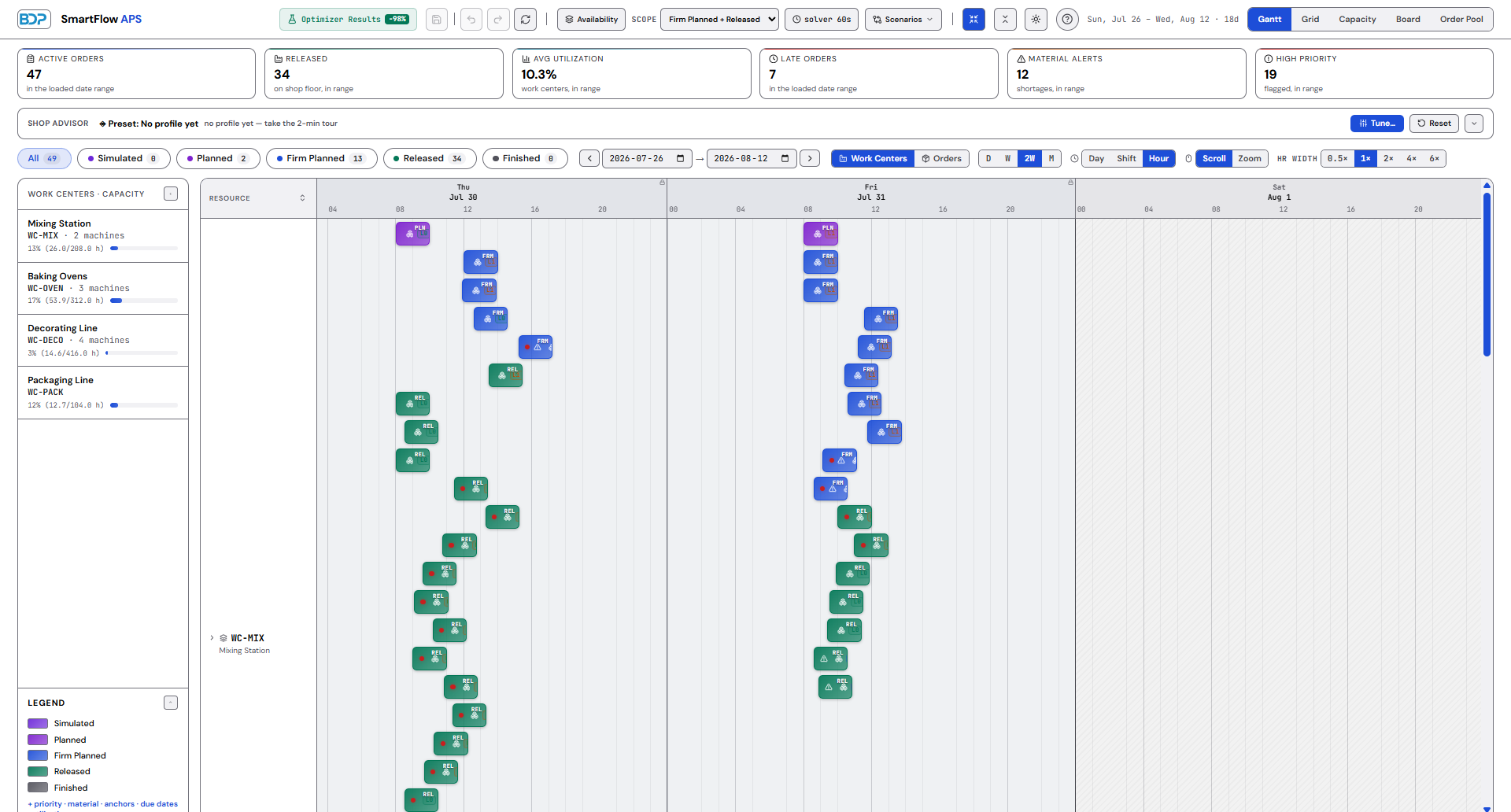
Every order, every work center, one board.
A color-coded Gantt grouped by work center, plus grid and workflow-board views. The whole schedule in front of you, not buried in a batch report.
Drag a bar. The schedule follows.
Drag an operation along the timeline to reschedule it; the change writes straight back to the standard production order. Select any order to open its Business Central card.
Run order, reordered to cut changeover.
The Sequence Optimizer ships with two engines: a fast algorithm that runs entirely inside Business Central, and a rigorous exact optimization engine you can switch on in Setup. Either way you review before/after and click Accept.
Fifty seconds, one board.
The overload, the drag, the optimizer and the finite scheduler — real screens, in the order a planner meets them.
Real math, with its work shown.
Sequence-dependent changeover — allergen boundaries, color families, certification limits — is a routing problem, not a gut call. SmartFlow reorders the run against a changeover matrix you configure, and shows the before and after side by side. Nothing writes back until you click Accept.
Which engine does the work is your choice in Setup. Out of the box, a fast algorithm runs entirely inside Business Central — no egress, no configuration. Turn on the cloud solver and the same job is handed to a rigorous exact optimization engine instead; if it's ever unreachable, the local algorithm picks the job back up rather than failing.
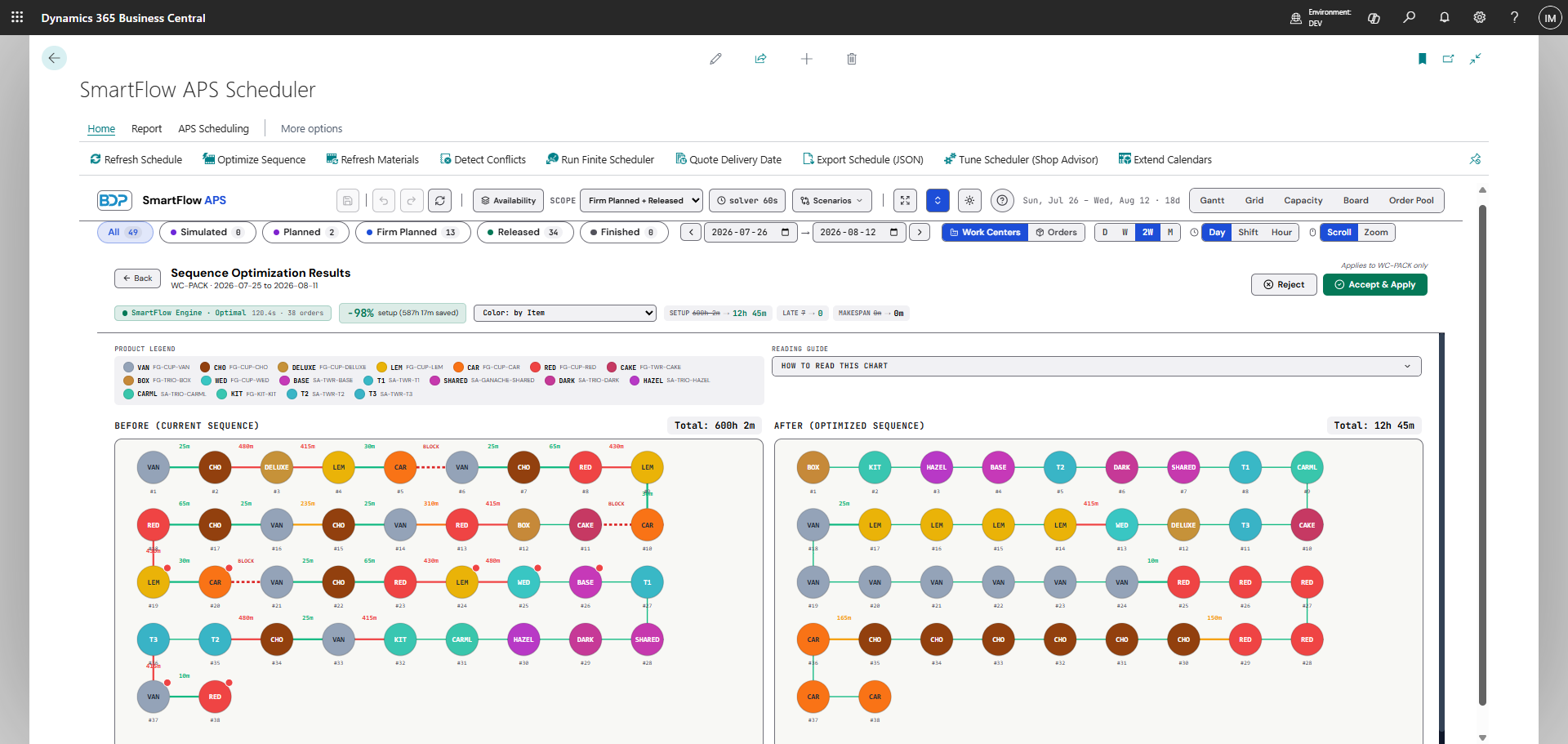
Screenshot taken on SmartFlow's seeded bakery sample dataset, which is built with a deliberate allergen-changeover overload. The saving is what the optimizer found on that data — not a benchmark, and not a result we're promising on yours.
Advanced planning — inside Business Central.
No second application. No separate login. No sync. SmartFlow reads and writes standard Business Central production data — one board for the whole plant, on the screen your planners already work in.
Move an operation, and Business Central knows.
Drag a bar along the work-center timeline to move an operation in time; the change is written straight back to the standard production order routing line. Select any order for a detail flyout with its operations, material status and conflicts, then open the standard production order card.
Cut changeover by grouping work that shares a setup.
Configure a changeover matrix for sequence-dependent setup, plus tag-based product attributes for allergen compatibility, certification boundaries and your own constraint types. Two engines: a fast algorithm that runs entirely inside Business Central, and a rigorous exact optimization engine you enable in Setup.
Know the state of the floor at a glance.
A live KPI strip (active and released orders, average utilization, late orders, material alerts, high priority), a Detect Conflicts action for overloads and late orders, and per-order material availability that nets on-hand and receipts against demand and safety stock.
Checkpoint the schedule before you commit to it.
Capture the current schedule as a named checkpoint and restore it later if the day goes sideways. It is a capture-and-restore checkpoint, not a side-by-side simulation — we'd rather name it precisely than oversell it.
No machine double-booked.
Send your selected work centers and date range to the scheduler and it builds a plan that respects every machine's real capacity — no operation starting before the one it follows, nothing stacked past what the shop can run, and every operation it moved flagged with the reason.
Planning around your real working time.
Shop and work-center shift calendars are honored to the minute. Calendars render on the board and the scheduler plans against them, so no work is placed on a closed day or outside a shift window.
The whole make-tree, phantoms and all.
The Order Explorer walks a multi-level bill of materials and its production orders together — phantom-aware, so sub-assemblies roll up the way your routing actually builds them, and you see what has to be made before what in one place.
Answering "when can we ship it?" from the plan.
Test a new or changed order against the current finite plan and get a completion date grounded in actual capacity and sequence rather than a guess.
Rescheduling what changed — not the whole plant.
When orders shift, replan around what moved instead of tearing up a plan that already works, so a small change stays a small change.
Every capability above writes back only to standard Business Central production tables — and only when you click Accept.
The same plan, read four ways.
Gantt
For planners — the timeline, grouped by work center.
Grid
For list people — sortable, filterable rows.
Workflow board
For the floor — orders as cards by status.
Capacity heatmap
For seeing overloads by work center and day.
From Business Central, and back again.
We don't promise. We deliver.
Everything on this page is built and running — no roadmap dressed up as a feature list. Put it on your own production orders for seven days and judge it before you pay for anything. Nothing writes back to Business Central until you click Accept, so you can see the plan before you commit to it.
Runs inside Business Central
One screen inside the product you already run. No second login, no separate application, and no data to sync or babysit.
A solver we can prove
A rigorous exact optimization engine is available, and we can substantiate it. It is a Setup choice, not the default: out of the box a fast local algorithm does the work, and it keeps working when the cloud can't be reached.
A trial that's fair
Seven days on your own data, no credit card to start, and no reinstall trick to reset the clock. Microsoft bills you if you keep it.
Built entirely on the Microsoft cloud — Dynamics 365 Business Central and Microsoft Azure — the same trust boundary you already accept for Business Central. No third-party vendor stack.