The invoice is a claim.
Your purchase order is the truth.
DocumentQ reads the vendor's PDF with an AI model — and then refuses to trust it. Every figure is reconciled against the purchase order and posted receipt already sitting in Business Central. On a PO-backed invoice, the numbers that reach your ledger come from your records, never from the document.
No per-vendor templates · built on Microsoft's Base Application · DocumentQ never posts on its own
8 × 120.00
= 960.00
read from the PDF
5 × 100.00
= 500.00
PO price · 5 received, 0 invoiced
5 × 100.00 = 500.00
Built from the posted receipt and the purchase order. The claimed figure never had a vote.
You already know what you owe. Nobody has time to check.
An accounts-payable team with a purchase-order culture already holds the answer: it is in the purchase order and the posted goods receipt. What is missing is anything that reads the vendor's PDF and checks it without a person running a two-screen, line-by-line audit.
So invoices get keyed, or transcribed by a capture tool that first has to be taught each vendor's layout — and re-taught the day that layout changes. Either way the number in the ledger came off the document, and the document is the one party in the transaction with a reason to be wrong.
- A quantity nobody received still gets paid.
- A price that drifted above the order goes unnoticed.
- The same invoice, forwarded twice, gets paid twice.
A confidence percentage tells a clerk how sure a model was. It does not tell them what to do, and it is not an audit trail.
The model reads the invoice. It does not get to write the invoice.
DocumentQ inverts the usual design. The AI never produces the document you post — Business Central's own Get Receipt Lines does. The extracted invoice is used only to verify that document and to decide whether a person needs to look at it.
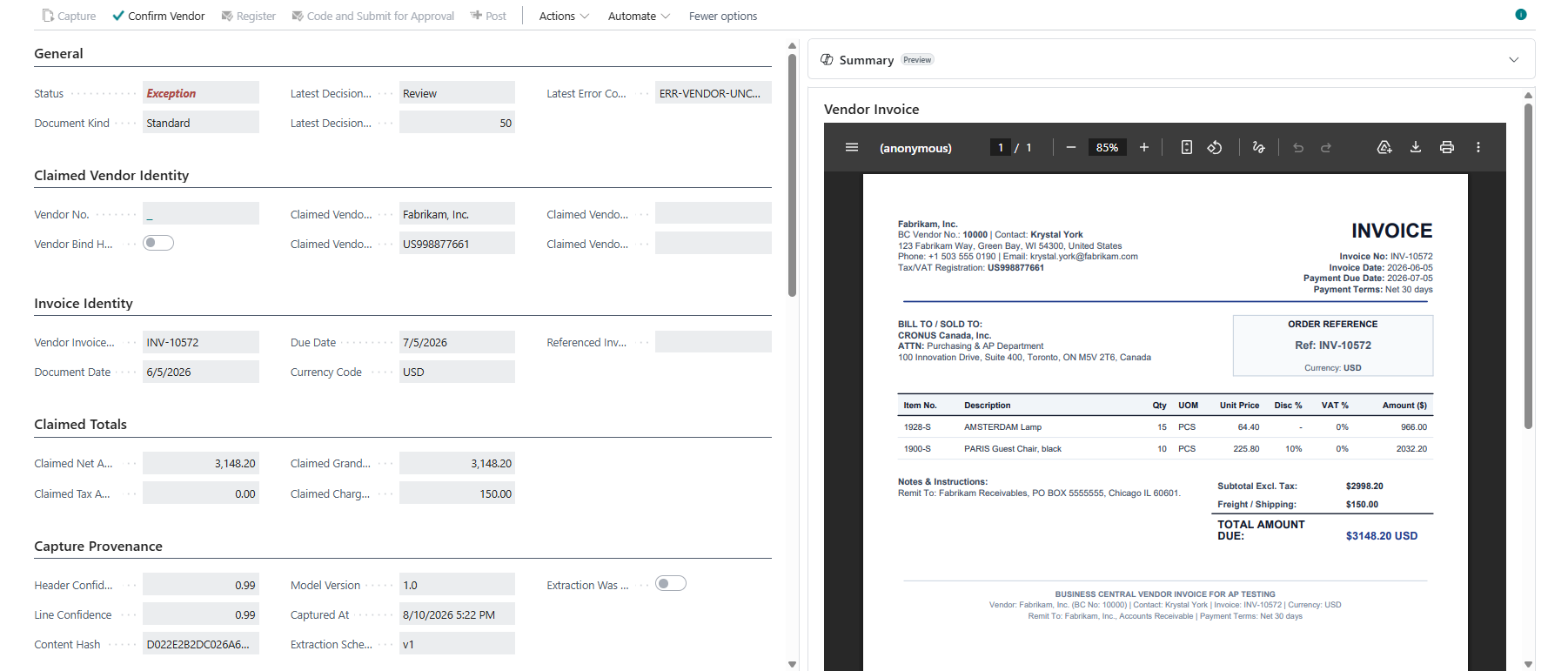
The extracted claim on the left, the vendor's own PDF on the right. Note the headings: Claimed vendor identity, Claimed totals — the product's own word for what a vendor asserts. Capture Provenance records the model version, the extraction schema and a content hash of the exact file that was read.
1 · No templates, ever
Extraction is semantic, not coordinate-mapped zones. A brand-new vendor's very first invoice is read the same way as an established vendor's hundredth — no training pass, and nothing to break when a vendor redesigns their layout.
No per-vendor setup2 · Structurally incapable of transcription error — on a PO-backed invoice
Quantities come from the posted receipt. Prices come from the purchase order. A hallucinated number, a garbled scan or a vendor's typo can cause an exception; it cannot become a figure in your ledger. This is scoped — read what it does not cover.
Reconciled, not transcribed3 · A reason, not a guess
Every exception carries a stable, documented error code — ERR-QTY-OVER, ERR-PRICE-VAR and more than twenty others — with the exact factor rows that produced it. Never a bare confidence percentage, never a paragraph the model wrote about your invoice.
Legible to an auditorFive steps, and only one of them trusts the document.
Step 1 is the only place the vendor's own words are used. Everything after it is deterministic Business Central logic running against records you already had.
The line that matters
DocumentQ can register a purchase invoice for you. Posting is always a separate human action, and where approval routing applies DocumentQ actively blocks posting until the document has been approved. There is no setting that makes DocumentQ post on its own.
Capture
The PDF is read into a structured claim — vendor, invoice number, dates, totals and lines.
Identify the vendor
Tax registration number, then GLN, then bank IBAN, then name similarity — in that order of trust, and a contradiction is never resolved by picking the higher score.
Reconcile
Claimed lines are matched against the purchase order and the posted receipt, inside the tolerances you set.
Decide
Either the document is Ready, or it is an Exception carrying one specific reason code and the factor rows behind it.
Register
Business Central builds the purchase invoice from your own PO and receipt lines. A person posts it.
A wrong claim cannot become a wrong posting.
You ordered 5 at 100.00. You received 5. The vendor invoices you for 8 at 120.00 — the kind of thing that happens by mistake, and occasionally on purpose. Follow what lands in the ledger, not what the model read.
It stops, and says why
The document lands on Exception with two codes: ERR-QTY-OVER (three more than remains uninvoiced on the receipt) and ERR-PRICE-VAR (20.00 per unit above the order). Both sides' figures are on screen, side by side.
A person decides, on the record
A reviewer acknowledges the exception with a note, or rejects the document, or overrides with the rights to do so. The decision, the note and every factor behind it are kept as the audit trail.
The built invoice carries 5 × 100.00
Not 8. Not 120.00. The line came from your posted receipt and your purchase order. It is not a tolerance setting that could be turned off — the function that builds the invoice pulls from what Business Central already knows was received.
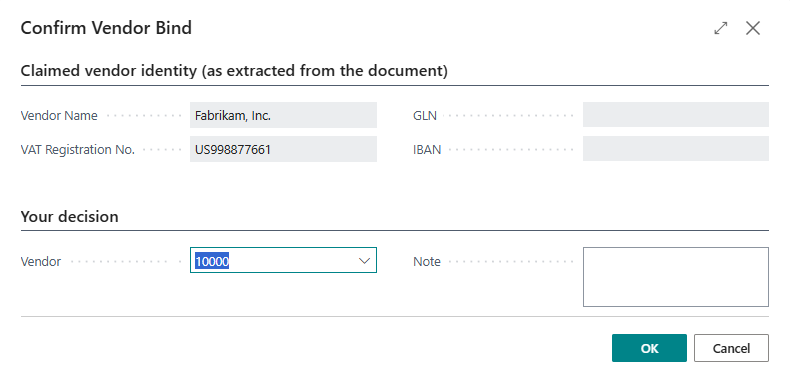
Step 02, in the product. What the document claims is shown read-only; underneath it, headed Your decision, is the part a person fills in — with a note that stays on the record. The order of those two blocks is the argument of this whole page.
Every exception says what happened, in words a clerk can act on.
A closed, documented set — not free text, and not a score. Twenty-six of them ship today; ten are shown here. And because a reason code is only worth as much as its threshold, DocumentQ also reports how often your team overrides each one.
| Code | What happened | Typical resolution |
|---|---|---|
| ERR-QTY-OVER | The invoice claims more than remains uninvoiced on the posted receipt. | Re-count the receipt, or ask the vendor for a credit. |
| ERR-PRICE-VAR | Unit price is above the purchase order beyond your tolerance. | Approve the increase, or dispute it. |
| ERR-LINE-MUT | Line amounts disagree with the purchase order even though the invoice total balances — a total-only check would miss this, and inventory valuation would be wrong. | Re-allocate the lines. |
| ERR-UNAUTH-CHG | A charge line — freight, handling, a surcharge — is outside the authorized set or over its cap. | Confirm the charge was authorized, or reject it. |
| ERR-UOM-MISMATCH | Unit of measure differs and no conversion exists. | Add the conversion, or correct the order. |
| ERR-VENDOR-CONTRADICT | Identifying signals point at different vendors — the tax number says one, the bank account another. | Disambiguate by hand. A contradiction is never settled by taking the higher score. |
| ERR-VENDOR-SELFMATCH | The “vendor” resolves to your own company or an excluded profile. Blocking, and not overridable. | Exclude that profile, or correct the claim. |
| ERR-DUPLICATE | This invoice has already been received, or already posted. | Confirm and discard. |
| ERR-CLAIM-INCONSISTENT | The invoice contradicts itself — its own line amounts do not add up to its own stated total. Checked before anything in Business Central is consulted. | Enter the real lines through manual coding. |
| ERR-NO-AUTHORITY | No purchase order and no contract stands behind this invoice. | Code it manually and route it for approval. |
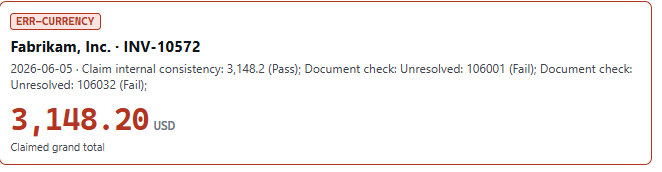
A real exception, as it appears on the document: the code, the checks that produced it, and the claimed total marked as a claim. No percentage anywhere.
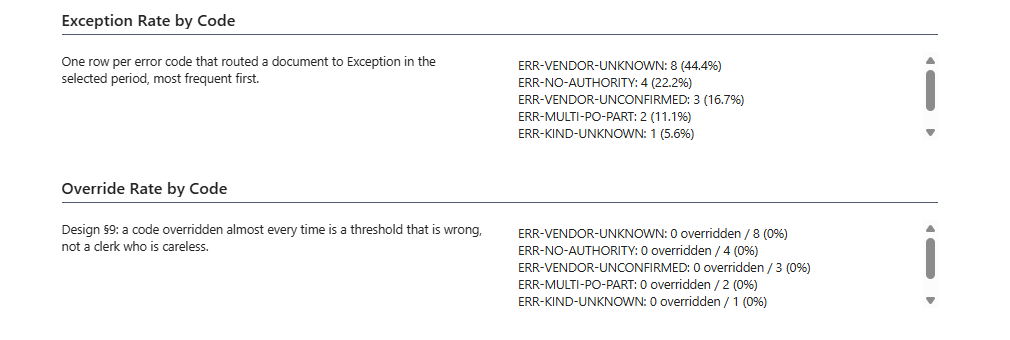
And DocumentQ measures whether its own codes are any good. The second list is the override rate per code, with the reasoning printed on the page: a code your team overrides almost every time is a threshold that is wrong, not a clerk who is careless. Tune the threshold; the product tells you which one.
Each code arrives with its decision factors — every check that ran, what it expected, what it found, and whether it passed. That is the answer to “why is this document sitting here?”, months later, for someone who was not in the room.
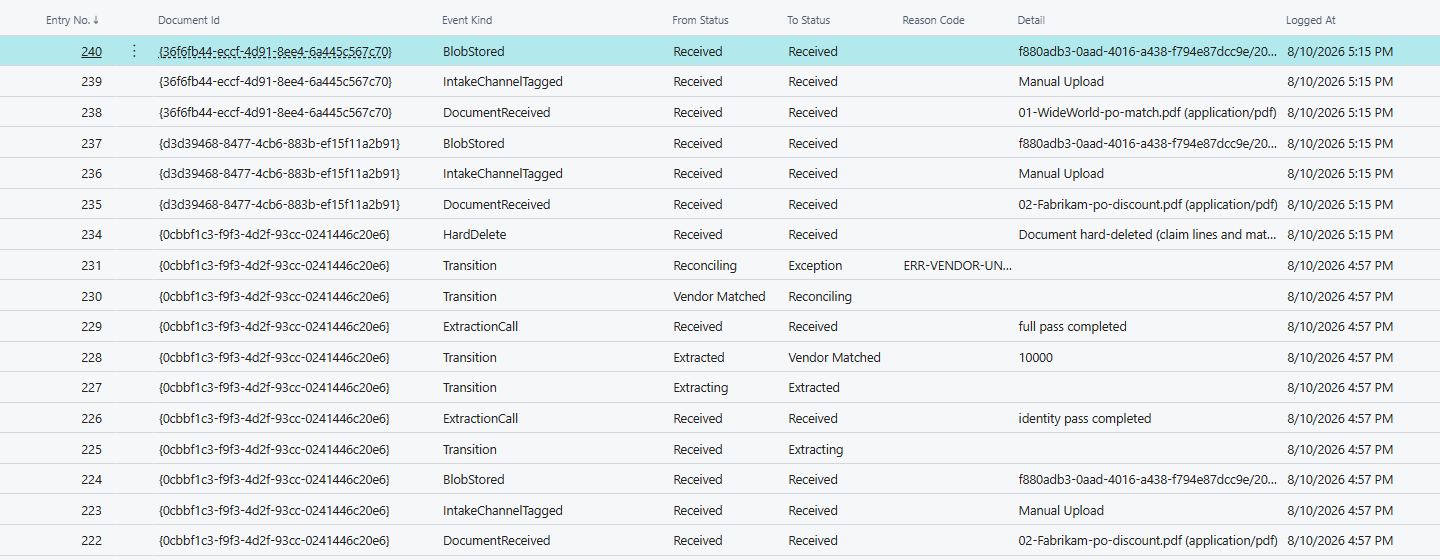
And it is not only the codes that are kept. Every transition is logged — intake channel, each extraction pass, vendor match, reconciliation, exception, and deletions too, because an audit log that omits those is not one. The acting user is recorded as well; that column is cropped out of this image rather than blurred.
Everything accounts payable needs, in a single install.
Capture, reconciliation, approvals and recurring contracts — not four separately-licensed modules you have to make agree with each other.
Two live intake routes
Upload a PDF, or open an invoice already sitting in Business Central's own Incoming Documents and choose Process with DocumentQ. Both run the identical code path — there is one intake implementation, not several that have to agree.
Duplicate protection, several ways
Identical file content, the same vendor and invoice number, and a match against invoices already posted. A confirmed duplicate is marked Superseded and kept for the audit trail rather than deleted.
A re-issued invoice is not a duplicate
When a vendor re-sends a corrected invoice under the same number, the file content differs — so it goes to a person as an exception instead of being silently discarded. Only a byte-identical re-send is superseded automatically.
Approvals on your own workflow
DocumentQ decides who should approve what, then submits through Business Central's native approval framework. Approvers use Requests to Approve and the standard purchase invoice page, exactly as they do for everything else. No parallel approval system, no second portal.
Recurring spend, checked against a contract
Rent, retainers and subscriptions have no purchase order and no receipt. Give them a contract row with a cap and a period, and those invoices get checked against it instead of being coded by hand every month.
The source PDF, where the auditor needs it
The vendor's own document is viewable beside the figures — including from the native purchase invoice and posted purchase invoice pages, so someone months later can see the source without leaving the page.
The one-off invoice with no purchase order.
Emergency repairs. A professional fee. Tree removal after a storm. Nobody raises a purchase order for these, and there will never be a receipt to check them against — so the safety property above does not apply, and DocumentQ does not pretend otherwise.
These invoices are supported, and handled deliberately differently: a person reads what was captured and types the G/L account and amount into an empty grid — nothing is pre-filled from what the model read — and the resulting invoice is submitted for approval immediately. Approval is the authority standing in for the receipt this invoice will never have, so it cannot be posted without one.
The document then carries a permanent mark — Manually Coded — styled differently from a reconciled one, and the mark stays on the record after posting. An auditor looking at the entry in three years can see it was never verified against a purchase order.
Say the qualifier every time
“Structurally incapable of transcription error” is true of a reconciled, PO-backed invoice, and is not true of a manually coded one.
On a manually coded invoice the posted figure is the figure a person entered after reading the document, and an approver's sign-off is the control. That is a real control — it is not the same guarantee, and DocumentQ marks the difference on the record rather than blurring it.
Three places invoice files can live. You choose.
Invoices are records most organisations must keep for years — well beyond the life of any one software subscription. So this is a real choice with real consequences, not a hidden default.
| Storage mode | Where the files live | Who holds them | If your subscription ends |
|---|---|---|---|
| BDP managed Azure storage (default) | Cloud storage operated by Business Dynamics Pro, separate from your Business Central database. | BDP. The only mode where we hold your files. | You keep read access for a 90-day grace period and can export every document during it. After that, retrieval needs an active subscription. |
| Business Central database | Inside your own environment, as a normal incoming-document attachment. | You. Nothing leaves Business Central. | Unaffected. Reading them does not involve DocumentQ at all. |
| Your own storage account | An Azure Blob Storage, Azure File Share or SharePoint account you own, configured once in Business Central. | You. Credentials are held by Business Central's own encrypted secret storage — DocumentQ never sees or stores them. | Unaffected, and directly accessible in your own account. |
Changing the mode later affects newly captured documents; anything already captured keeps being read from wherever it was stored, so switching is safe and never strands a document. Deleting a document in Business Central deletes its stored file too, in the same operation, whichever mode it was under.
What leaves your tenant
The invoice document itself, sent through BDP's own service to a third-party AI service for extraction — that is what the AI step is. And a short vendor extraction hint, if someone on your team has written one describing that vendor's layout.
Nothing else. No customer master data, no chart of accounts, no other vendor records, no ledger entries.
What BDP keeps
Not the extracted invoice data. Vendor name, invoice number, lines and amounts are returned to your environment and not retained by our service.
We keep your account record (Microsoft Entra tenant identifier, subscription status, an encrypted admin contact address) and a usage record per document processed — which internal document identifier, when, and the processing cost. No vendor names, invoice numbers, amounts or document content.
One plan. Everything included. No per-user fee.
DocumentQ is priced per Business Central tenant, per calendar month, banded by how many documents you process that month. Not per user, not per company, not per environment.
USD365
per month · 201–300 documents
Capture, reconciliation against your purchase orders and posted receipts, approval routing on Business Central's own workflow, recurring contracts, duplicate protection and the document storage mode of your choice — all of it, in the one price. There is no module you have to add later to make the product do what you bought it for.
List price, USD, excluding tax. Your band adjusts automatically with your volume — there is no tier to commit to and buy up to.
| Documents per month | List price (USD / month) | At the top of the band, per document |
|---|---|---|
| 26 – 100 | 165 | 1.65 |
| 101 – 200 | 255 | 1.28 |
| 201 – 300 | 365 | 1.22 |
| 301 – 400 | 465 | 1.16 |
| 401 – 500 | 535 | 1.07 |
| 501 – 750 | 615 | 0.82 |
| 751 – 1,000 | 755 | 0.76 |
| 1,001 – 1,500 | 950 | 0.63 |
| 1,501 – 2,000 | 1,195 | 0.60 |
| 2,001 – 2,500 | 1,390 | 0.56 |
List pricing
The bands continue above 2,500 documents a month, and lower-volume and Canadian-dollar
pricing is available. Prices shown are list, in US dollars, excluding tax, and are subject
to change. Talk to us for a quote for your volume,
your currency, or a trial.
What is not charged for. Additional companies, additional production environments, and additional Business Central users are not priced separately — an accounts-payable department with three licensed clerks and one with forty pay the same for the same document volume, because the work is the same.
The things buyers actually ask.
Microsoft added three-way matching to the Payables Agent. Why do we need this?
For a lot of AP work, you may not. If your invoices are largely services with G/L coding, turn the agent on — it is included, it is from the platform owner, and it does that job.
We are built for the case underneath it: invoices tied to physical goods receipts, at volume, on multi-line documents. That is where the reported gaps are — hundreds or thousands of purchase lines a month, department coding, project allocation and multi-dimension splits, and PO and non-PO invoices running as two parallel processes rather than one.
There is also a difference in kind, not just coverage. A matching engine answers how confident am I that these documents correspond. DocumentQ answers which number reached your ledger, and why — a named reason code with its factor rows, and a posted figure that comes from your receipt and your order rather than from the document. Those are different questions. The second one is the one you get asked in an audit.
The two are not exclusive, and we would rather you evaluate both than take our word for it.
What happens if the AI completely misreads an invoice?
On a PO-backed invoice, it does not reach your ledger. The quantity that gets posted comes from your posted receipt and the price from your purchase order, so a bad read causes an exception someone has to look at — not a wrong number. The model does not have to be perfect to be safe.
On a one-off invoice with no purchase order there is nothing external to check against, and a person plus a mandatory approval is the control. See the scoping above; we would rather tell you now than have you find it.
Do we have to train it on each vendor's invoice layout?
No. There is no template step at all. Extraction reads the meaning of the document rather than memorised zones on a page, so a brand-new vendor's first invoice is handled the same way as an established vendor's hundredth — and nothing breaks when a vendor redesigns their invoice.
Can DocumentQ post to our ledger by itself?
No. DocumentQ can build (“register”) a Business Central purchase invoice, including automatically for a fully reconciled document from a vendor you have specifically opted in. Posting is always a human action, and where approval routing applies DocumentQ actively blocks posting until the document is approved. There is no setting that changes this.
How do invoices get in?
Two live routes today: upload a PDF, or open an invoice already in Business Central's own Incoming Documents and choose Process with DocumentQ. Both run the identical intake code, so nothing about accuracy or reconciliation differs between them.
Do our approvers have to learn another system?
No. DocumentQ decides who should approve what and then submits through Business Central's own approval framework — approvers work in Requests to Approve and on the standard purchase invoice page. Approval state is read live from Business Central's own approval entries and is never copied onto the DocumentQ record: DocumentQ routes, Business Central remains the record of who decided.
Who holds our invoice PDFs?
Whoever you choose. The default keeps them out of your Business Central database in storage BDP operates; you can instead keep them inside Business Central, or in an Azure Blob Storage, Azure File Share or SharePoint account you own — in which case your credentials stay in Business Central's own encrypted secret storage and are never sent to any BDP service. The three modes are compared above.
What is sent to the AI provider?
The invoice document itself, and a short vendor extraction hint if someone on your team has written one. Nothing else from your Business Central data — no customer records, no chart of accounts, no other vendors, no ledger entries. The extracted result is returned to your environment and is not retained by our service. Full detail is in the privacy statement.
What does it need to run?
Business Central online, platform and application 26.0 or later, and a user with SUPER for first-time setup. Setup is six steps and takes a few minutes. You get the most out of it if you work purchase-order first, and if your vendors carry tax registration numbers — those are what vendor identification matches on first.
Is it on Microsoft AppSource?
Yes. BDP DocumentQ – AI AP Automation is listed on Microsoft AppSource, built on Microsoft's Base Application. Get in touch to arrange a demo or to talk about fitting it to your approval process.
Watch a wrong claim fail to move the number.
Book a walkthrough: a purchase order for 5 at 100.00, a posted receipt, and an invoice claiming 8 at 120.00 — then look at what actually gets built.